Common Store Patterns
Ready-made recipes for common e-commerce scenarios. Copy these patterns to quickly set up pages that convert.
Overview
These patterns are battle-tested combinations of sections that work well together. Use them as starting points and customize to match your brand.
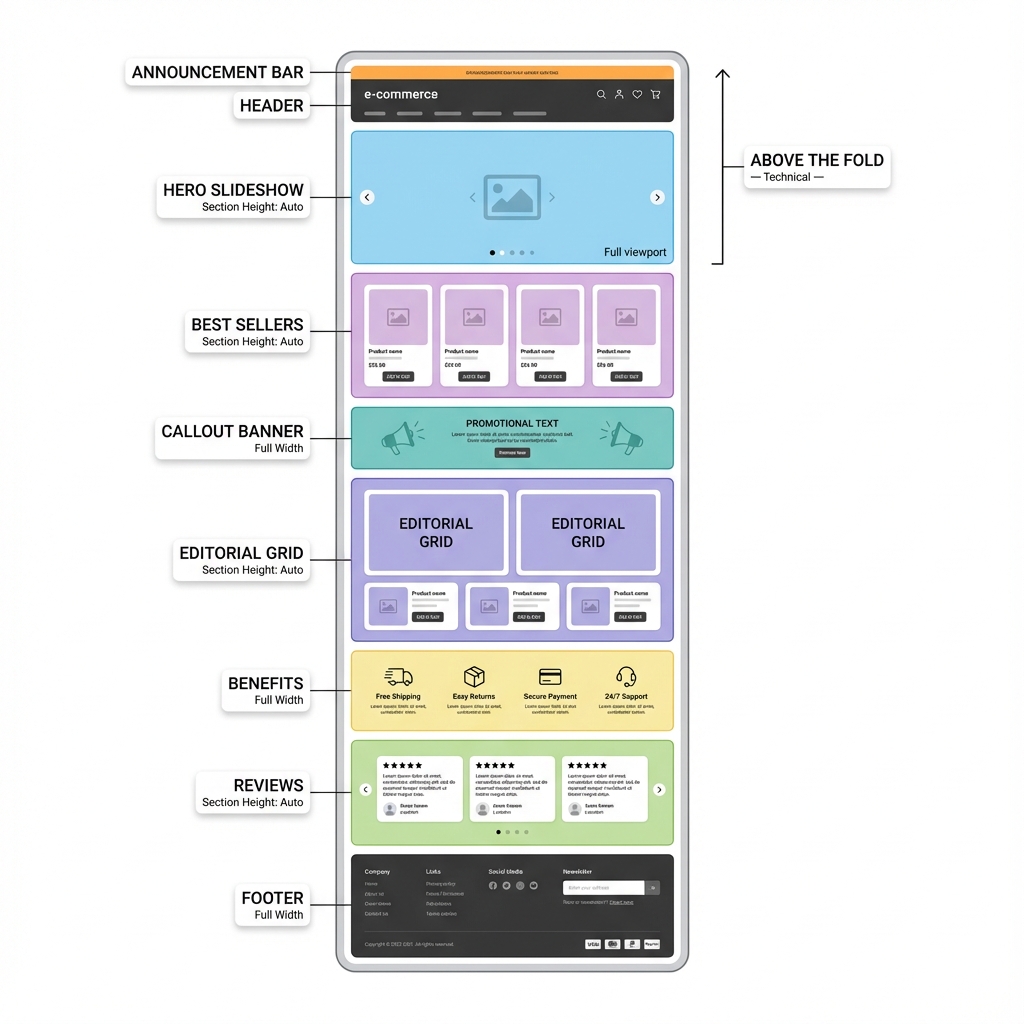
Typical homepage section stacking: Hero at top, products in middle, trust elements near bottom
Homepage Patterns
Pattern 1: High-Impact Fashion
Best for: Fashion, beauty, lifestyle brands seeking a luxury feel.
Hero Slideshow
Add Slideshow with 3-4 lifestyle slides. Use full-viewport height, fade transitions, and 6-second autoplay.
Editorial Grid
Add Editorial Grid with your main collection. Set up a hero pattern with 2x2 tiles alternating sides.
Shop the Look
Add Shop the Look with 2-3 lifestyle images featuring multiple products with hotspots.
Benefits Bar
Add Benefits with 4 columns: Free Shipping, Easy Returns, Secure Payment, Customer Support.
Reviews
Add Reviews with 5-6 customer testimonials in slider format.
Newsletter + Social
Add Newsletter Popup (time-based, 5 second delay) and Social Highlights section.
Section order:
1. Slideshow (hero)
2. Editorial Grid (products)
3. Callout Banner (promotion)
4. Shop the Look (lifestyle)
5. Benefits (trust)
6. Reviews (social proof)
7. Social Highlights (community)
Pattern 2: Product-Focused
Best for: Electronics, home goods, single-category stores.
Hero Banner
Add Hero Banner with your flagship product or collection. Include a clear CTA button.
Best Sellers
Add Best Sellers section showcasing your top 6-8 products with numbered rankings.
Feature Callout
Add Callout Banner highlighting a key benefit (free shipping, warranty, etc.).
New Releases
Add New Releases section with your latest products in horizontal slider.
FAQ
Add FAQ section answering common product questions.
Section order:
1. Hero Banner
2. Best Sellers
3. Callout Banner
4. New Releases
5. Benefits
6. FAQ
7. Reviews
Pattern 3: Minimal/Modern
Best for: Minimal brands, art, photography, premium products.
Full-Screen Hero
Use Hero Banner with full viewport height, minimal text, center-aligned.
Product Grid
Add Collection Product Grid with 3 columns, generous spacing, no quick-add.
Parallax Section
Add Parallax Trigger between sections for dramatic scrolling effects.
Text Block
Add Text Block with your brand story, center-aligned, fade-up animation.
Section order:
1. Hero Banner (full viewport)
2. Parallax Trigger
3. Product Grid (minimal cards)
4. Text Block (brand story)
5. Parallax Trigger
6. Social Highlights
Collection Page Patterns
Collection with Hero
Collection Hero
Use a Hero Banner at the top with the collection's featured image and title.
Editorial Grid
Add Editorial Grid for the main products with filtering enabled.
Related Collections
Add Featured Collection Row linking to related collections.
Collection with Filters
Product Grid
Use Collection Product Grid as the main section with sidebar filters.
Recommendations
Add Product Recommendations at the bottom for cross-selling.
Product Page Patterns
High-Converting Product Page
Optimize the Gallery
Use Runway layout for fashion, 50/50 for products needing description space.
Add Trust Elements
Enable stock indicators, shipping estimates, and trust badges in product settings.
Cross-Sell
Add Product Recommendations section set to "Complementary" with 4 products.
Social Proof
Add Reviews section with product-specific testimonials.
FAQ
Add FAQ section with product-specific questions (sizing, care, warranty).
Section order:
1. Product Template (main)
2. Product Recommendations
3. Reviews
4. FAQ
5. Recently Viewed
Landing Page Patterns
Sale/Promotion Page
Attention-Grabbing Header
Use Hero Banner with urgent messaging ("50% OFF - ENDS TONIGHT").
Countdown
If available, add a countdown timer to create urgency.
Sale Products
Add Editorial Grid or Product Grid showing sale items.
Benefits
Add Benefits with sale-specific messaging (limited time, free shipping on sale, etc.).
New Collection Launch
Cinematic Opening
Use Reveal Slider with dramatic product reveals.
Hero Split
Add Hero Split showcasing the collection concept (e.g., "For Him" and "For Her").
Product Showcase
Add New Releases with collection-specific products.
Behind the Scenes
Add Text Block or Before/After showing the design process.
Seasonal Patterns
Holiday Homepage
- Replace hero with holiday-themed Slideshow
- Add Callout Banner for holiday shipping deadlines
- Create a "Gift Guide" collection and feature it prominently
- Add FAQ with holiday shipping questions
- Update Newsletter Popup with holiday incentive
Summer Sale
- Use bright, high-energy hero imagery
- Add countdown timer for sale end
- Create "Summer Favorites" best sellers section
- Highlight fast shipping for vacation season
Tips for All Patterns
Test on mobile first. Over 60% of e-commerce traffic is mobile. Always preview your patterns on a phone before publishing.
Use consistent spacing. Keep the same spacing options across sections for visual harmony.
Don't overload the homepage. 5-7 sections is usually enough. Too many sections slow page load and overwhelm visitors.
A/B test patterns. Try different section orders and measure which converts better using Shopify Analytics or Google Analytics.
Pattern Checklist
Before publishing any pattern, verify:
- [ ] All sections have content (no placeholder text)
- [ ] Images are high-quality and properly sized
- [ ] All links work correctly
- [ ] Mobile layout looks good
- [ ] Page load time is under 3 seconds
- [ ] CTAs are clear and compelling